How To Start A Gaming Blog With WordPress | Full Step-by-Step Guide
What You'll Get From Reading This:
- A clear explanation of why WordPress.org (not WordPress.com) is the only smart choice for a monetized gaming blog, and how to set it up correctly from scratch.
- A realistic first-year cost breakdown so you know exactly what starting a gaming blog will actually cost before you commit.
- A starter content plan covering the first 10 posts your gaming blog should publish, in order, with the strategic reason behind each one.
- Honest income timelines so you know what to expect at months 1, 3, 6, and 12, rather than discovering the hard way that blogging takes longer than most guides admit.
- A launch readiness checklist so you don't go live with a blog that's missing something important.
You want to share what you know about gaming. Maybe you've spent 300 hours in a single RPG and have opinions worth reading. Maybe you follow competitive FPS like it's a second job. Whatever your angle, starting a gaming blog is a real, achievable goal, and WordPress makes the technical side more manageable than it has any right to be.
The problem isn't getting started. The problem is that most guides stop at "install WordPress and pick a theme" without telling you what to do next, or worse, without warning you about the mistakes that quietly kill most new gaming blogs in the first three months.
We have covered the full picture, like setup, strategy, content, promotion, and monetization. Think of it as the guide every gaming blogger wished existed when building a first gaming blog from scratch while juggling a day job and learning everything through trial, error, and a lot of forum posts.
Why Most Gaming Blogs Fail Before They Start And How To Avoid It
The honest reason to read this section first is that the technical setup is the easy part. The hard part is what comes before and after it.
The Real Reason New Gaming Blogs Don't Get Traffic
Imagine a gamer named Alex. Alex loves tactical shooters, knows every map in the game's current rotation, and has spent more time analyzing movement mechanics than most people spend on homework. Alex builds a WordPress site in a weekend, writes five posts about gaming in general, and then wonders why nobody shows up.
The blog didn't fail because Alex chose the wrong theme. It failed because "gaming in general" is not a niche. It's a category. There are thousands of sites covering "gaming in general," including IGN, GameSpot, and Kotaku.
A new blogger cannot compete with that. What Alex can compete with is "competitive movement mechanics in tactical shooters" or "beginner mistakes in the ranked queue," because those are specific, searchable, and underserved.
Most gaming blogs that fail share the same three problems: no specific niche, no content strategy (just posting whenever inspiration strikes), and no realistic expectations about how long organic traffic takes to build.
What This Guide Does Differently
Every other guide on this topic treats blogging as a website problem. Install the right software, pick the right theme, add a few plugins, and done. This guide treats it as a publishing strategy problem that also happens to involve some website setup. You'll build the technical foundation correctly, but you'll also leave knowing what to write, when to write it, and what to realistically expect.
The steps are in the order they need to happen. Don't skip ahead to themes and plugins before you've nailed your niche. The technical choices you make will be completely different depending on your direction.

Step 1: Choose A Specific Gaming Niche Before You Build Anything
The most important decision you'll make happens before you register a domain or open a hosting account. Getting the niche right at the start will determine whether your blog attracts a real audience or drifts into obscurity.
Why A Broad Gaming Blog Is The Hardest Type To Grow
A broad gaming blog competes with the entire internet. That's not an exaggeration. Search engines rank established, authoritative sites for general gaming topics because those sites have thousands of pages, years of backlinks, and dedicated editorial teams.
What new blogs can do is carve out a specific corner of that space. Google's ranking systems are built to identify topical authority, and the idea that a site covering one specific thing thoroughly is more trustworthy on that topic than a site that covers everything loosely. A blog entirely devoted to Soulslike games will build authority in that niche faster than a general gaming blog that covers Soulslike once a month alongside a dozen other topics.
How To Find A Sub-Niche With Real Search Demand
The goal is to find something specific enough to stand out but popular enough that people are actively searching for it. Here's how to validate a niche before committing to it.
Using Google Trends To Validate Your Niche Idea
Go to Google Trends and search for your potential niche topic. Look at the interest graph over the past five years. You're looking for stable or upward trends, not a spike from three years ago followed by silence. If interest is growing or holding steady, there's an ongoing audience. If it peaked and fell, think carefully before committing.
You can also compare two or three niche ideas directly in Trends to see which has more consistent search volume. This won't give you exact numbers, but it tells you relative demand.
Using Reddit And Gaming Forums To Find What Players Are Asking
Reddit's gaming communities are one of the best free research tools available. Visit subreddits like r/gaming, r/GameSuggestions, or any game-specific subreddit relevant to your potential niche. Sort by "Top" posts over the past month and look at what questions come up repeatedly. Those repeated questions are content opportunities. If people ask the same question every week, a well-written blog post answering it comprehensively has a real chance of ranking.
Examples Of Profitable Gaming Blog Niches
These are starting points, not exhaustive options:
- Platform-specific guides:PC gaming optimization, console setup tutorials, handheld gaming (Steam Deck, Switch)
- Genre-focused coverage:Soulslike difficulty analysis, cozy game reviews, survival game tier lists
- Game-specific depth:A single popular live-service game covered exhaustively (builds, patches, ranked strategy)
- Gaming adjacent:Gaming chair and peripheral reviews, game music, game writing, and narrative design
- Competitive/esports:Amateur coaching, ranked improvement guides for specific games
The One Question To Ask Before You Commit To A Niche
Can you write 50 posts on this topic without running out of ideas? If the answer is yes, you have a niche. If you're already struggling at ten, narrow it further or pick something else.
Your niche shapes every decision that follows: your domain name, your theme, your content calendar, and your monetization options. Get this right first.

Step 2: Choose The Right Platform
Once you know your niche, the next decision is which platform to build on. The short answer is WordPress. The longer answer requires an important clarification that almost every beginner's guide glosses over.
WordPress.com Vs. WordPress.org: What's The Actual Difference?
The name "WordPress" refers to two genuinely different products. Getting them confused costs new bloggers real money and time.
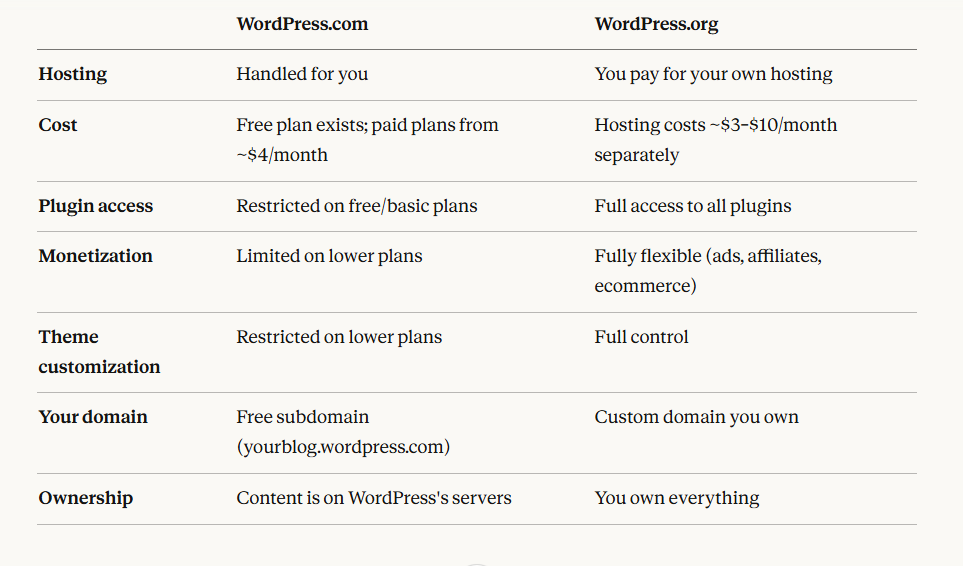
Why Self-Hosted WordPress Is The Only Real Option For A Monetized Gaming Blog
WordPress.org (self-hosted) gives you complete control over your site, your content, and your revenue. You can install any plugin, use any ad network, and build your audience without platform restrictions getting in the way.
WordPress.com's free tier places ads on your site without paying you for them. Its lower-paid plans restrict the plugins you can install, which means you can't add game review schemas, affiliate link managers, or advanced SEO tools without upgrading significantly.
For a gaming blog you plan to grow and eventually monetize, WordPress.org on your own hosting is the correct choice. The rest of this guide assumes you're using it.
What "Free" WordPress Actually Costs You In The Long Run
WordPress.org software is genuinely free to download and use. What isn't free is the hosting that runs it. A basic shared hosting plan costs roughly $3–$8/month (billed annually), and a domain name costs approximately $10–$15/year.
Your total first-year cost for a functional gaming blog will typically land between $50 and $120 USD. That covers hosting, a domain name, and a free or modestly priced theme. You don't need to spend more than that to start.
Premium plugins, premium themes, and SEO tools are optional at the beginning. Spend on those only after you've validated that the blog has traction.

Step 3: Register A Domain Name And Choose A Hosting Plan
This is where your gaming blog officially starts to exist. Picking a strong domain and a reliable host takes maybe an afternoon. Changing them later is a serious headache, so take the time to do this right.
How To Pick A Domain Name For A Gaming Blog
Your domain name is the address people type to find your site. It's also part of your brand, and it will appear in every link, social media bio, and email you ever send about the blog.
What Makes A Good Gaming Blog Domain Name
- Keep it short:Aim for two to three words. Anything longer gets mistyped.
- Make it easy to spell and say aloud:If you have to spell it out every time you mention it, reconsider.
- Avoid hyphens and numbers:"game-tips-101.com" looks like a spam site. "gametips.com" is clean and credible.
- Reflect your niche without boxing yourself in:A domain called "pcgamingbuilds.com" is clear, but it locks you out of console content if your blog evolves. Think about whether a slightly broader name gives you room to grow.
- Check availability on social platforms too:You want the same handle on YouTube, Twitter/X, and Instagram. Search before registering.
Use a domain name generator (Nameboy, Lean Domain Search, or your registrar's own tool) to brainstorm options. Come up with at least five candidates before registering, in case your first choice is taken.
Where To Register Your Domain
Popular registrars include Namecheap, GoDaddy, and Porkbun. Many hosting providers also let you register a domain directly when you sign up, which simplifies the process. If your host offers a free domain for the first year (common with Bluehost and Hostinger), take it, but just make sure you understand their renewal pricing before committing.
What Kind Of Hosting Does A New Gaming Blog Actually Need?
Shared Hosting Vs. Managed WordPress Hosting
Shared hosting means your site shares a server with many other sites. It's the most affordable option and perfectly adequate for a new blog with low traffic. Managed WordPress hosting costs more but includes performance optimization, automatic updates, and better support specifically for WordPress sites.
For a brand-new gaming blog, shared hosting is the right choice. Once you're consistently getting 25,000+ monthly visitors, it makes sense to look at managed hosting options like WP Engine or Kinsta. Starting there is like buying a high-performance car before you have a driver's license.
What To Look For In A Gaming Blog Host
- Uptime guarantee of 99.9% or better:Anything lower than this is a red flag. (100% uptime guarantees are marketing language; no host can truly promise that.)
- One-click WordPress installation:Every reputable host offers this. It saves you hours.
- Automatic daily or weekly backups:If your site gets hacked or breaks after an update, a backup is what saves you.
- Free SSL certificate:This encrypts your site's connection and is required for basic trust signals and Google ranking. Every decent host includes this.
- Responsive support:Live chat or 24/7 ticket support matters when something breaks at 11 pm before a big post goes live.
Recommended Hosting Options
Hostinger, Bluehost, and SiteGround are consistently recommended for beginners. Hostinger is often the most affordable entry point and includes WordPress pre-installed on most plans. SiteGround has a strong reputation for support quality. Bluehost is one of the longest-standing beginner recommendations and includes a free domain for the first year.
Check each provider's site for current promotional pricing, as introductory rates often differ significantly from renewal rates.)
How To Connect Your Domain To Your Hosting Account
If you registered your domain through your hosting provider, this step is handled automatically. If you registered with a separate registrar, you'll need to point your domain's nameservers to your host. Your hosting provider's support documentation will give you the exact nameserver addresses. The change typically takes a few minutes to a few hours to propagate.

Step 4: Install WordPress And Configure It The Right Way
Most beginners install WordPress correctly, but then launch their blog with five default settings that quietly hurt their SEO and readability. This section covers installation and the setup steps that actually matter.
How To Install WordPress Using Your Host's One-Click Installer
Log in to your hosting account's control panel (usually cPanel or hPanel). Look for a section called "WordPress" or "Website Builder" and click the one-click installer. You'll be asked to choose which domain to install it on, set an admin username and password, and enter your site name.
Once installed, your WordPress dashboard is accessible at yourdomain.com/wp-admin. Bookmark this URL. You'll use it constantly.
The Six WordPress Settings You Must Change Before Publishing Anything
Setting Your Permalinks To "Post Name"
Go to Settings > Permalinksand select "Post name." This makes your URLs look like yourdomain.com/best-rpg-games instead of yourdomain.com/?p=123. The second format is unreadable to humans and less useful to search engines.
Configuring Your Site Title And Tagline
Go to Settings > Generaland enter your blog's name and a short tagline that describes what it's about. This appears in browser tabs and search results.
Setting A Static Homepage Vs. Latest Posts
Go to Settings > Reading. If you want your homepage to show your latest blog posts in a feed (common for content-focused blogs), leave this as "Your latest posts." If you plan to design a custom homepage later, set a static page here.
Deleting Default Sample Content
WordPress installs with a sample post called "Hello World" and a page called "Sample Page." Delete both. They serve no purpose and make your site look unfinished if someone lands on them.
Configuring Your Reading And Discussion Settings
Under Settings > Discussion, decide whether you want comments enabled. Comments can build community on a gaming blog, but they also require moderation to prevent spam. If you're not ready to manage that, turn them off and enable them later.
Installing A Security Certificate (SSL)
Most hosts install an SSL certificate automatically during WordPress setup. Confirm it's active by checking whether your site loads with "https://" in the URL. If it doesn't, your host's support team can activate it in minutes.
These six steps take less than fifteen minutes and prevent problems that are annoying to fix after you've published content.
Step 5: Choose A WordPress Theme For Your Gaming Blog
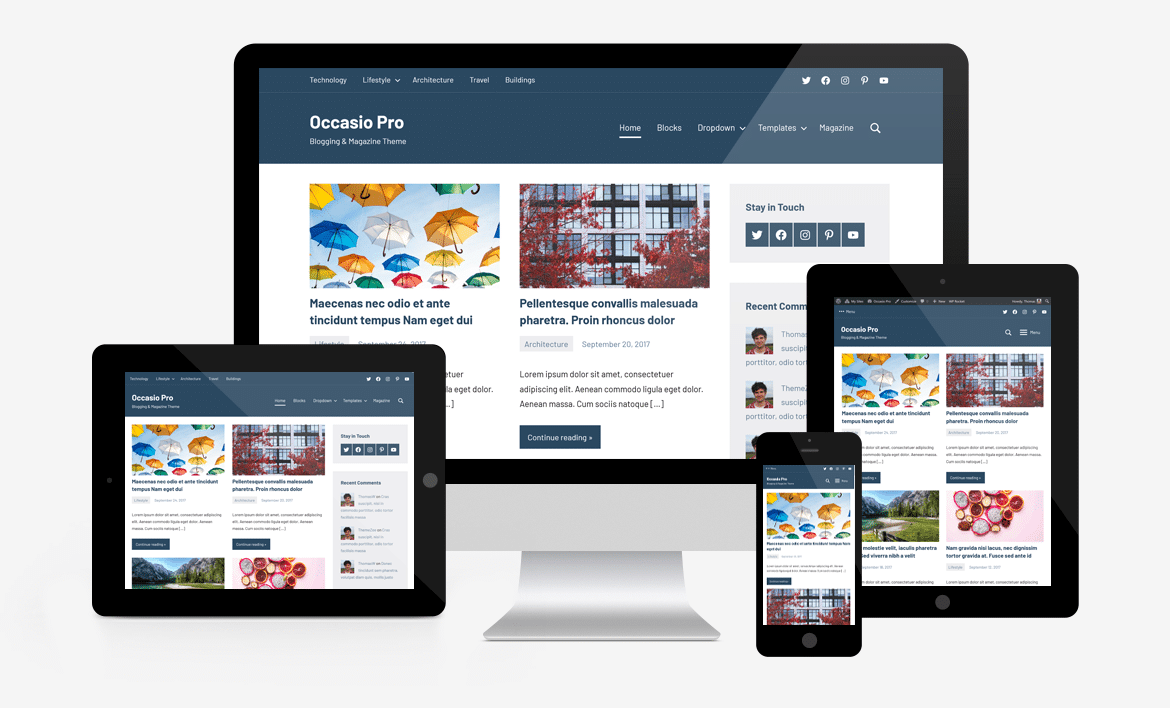
Your theme controls how your blog looks. The right one makes your content easy to read and easy to navigate. The wrong one either slows your site down or locks you into a design that doesn't fit your niche.
What Makes A Gaming Theme Different From A Generic Blog Theme
Gaming themes typically include dark mode aesthetics, support for featured media (screenshots, game trailers), layouts designed for review scores, and elements that reflect gaming culture visually. A generic business theme can technically host gaming content, but it won't feel native to the audience.
That said, a "gaming" label on a theme doesn't automatically make it good. Speed and mobile responsiveness matter more than aesthetics for SEO and reader experience.
Free Vs. Premium Gaming Themes
Free themes from the official WordPress theme repository (wordpress.org/themes) are legitimate and well-maintained. For a brand-new blog with zero revenue, starting with a free theme is completely sensible.
Premium themes (typically $30-$80 as a one-time purchase) usually offer more design flexibility, dedicated support, and regular updates. The upgrade makes sense when you have a clear vision for your site's design and need features that the free options don't provide.
One honest note:A premium theme won't drive traffic. Content and SEO drive traffic. Invest in a premium theme when you're ready, not as a substitute for a content strategy.
Recommended Gaming Blog Themes
- Astra(free, with premium upgrade): Lightweight, fast, and highly customizable. Works for almost any gaming niche. Not visually "gamer" by default, but easy to style that way.
- Newspaper(premium): Built for content-heavy sites. Strong options for reviews, news, and magazine-style layouts. Popular with gaming review sites.
- PlayerX(premium): Designed specifically for gaming and eSports. Includes layouts for team pages, match schedules, and game reviews. Best for competitive or eSports-focused blogs.
- Kadence(free, with premium upgrade): Similar to Astra in speed and flexibility. Excellent for beginners who want a clean, fast foundation.
How To Install And Customize Your WordPress Theme Without Coding
Go to Appearance > Themes > Add Newin your WordPress dashboard. Search for your chosen theme by name and click Install, then Activate. Most free themes include a setup wizard that guides you through basic customization (colors, fonts, logo upload). Premium themes typically include detailed documentation.
Don't spend weeks perfecting the design before publishing any content. A clean, fast, readable theme is all you need at the start. You can refine the design later once you know which pages and layouts your readers actually use.
Step 6: Install The Right Plugins
Plugins are what make WordPress flexible. They're also what make a lot of new blogs slow, broken, or overwhelming to manage. The key is knowing which ones to install on day one and which ones to add later.
Why Plugin Overload Kills New Blogs
Every plugin you install adds code that runs on your site. Five well-chosen plugins add functionality cleanly. Twenty plugins from different developers, some outdated and some conflicting, can cause pages to load slowly, break your layout, or create security vulnerabilities. Install only what you need, when you need it.
A mistake Jordan sees often in newly launched gaming blogs is installing every plugin from a "top 20 list" before publishing a single post. Half of those plugins won't get used for months. Start lean.
The 4 Plugins Every Gaming Blog Needs On Day One
SEO Plugin - Yoast SEO Or Rank Math
Both are excellent free options and are widely considered among the best WordPress SEO pluginsavailable for beginners. They help you write SEO-optimized titles and meta descriptions, generate XML sitemaps, and check your content for basic optimization issues. Install one, not both. Yoast is slightly more beginner-friendly. Rank Math offers more features for free.
Security Plugin: Wordfence
Wordfence provides a firewall, malware scanner, and login protection. The free version is sufficient for a new blog. Enable it immediately after installing WordPress, before you do anything else.
Caching Plugin: LiteSpeed Cache Or WP Super Cache
Caching plugins create static versions of your pages so they load faster for repeat visitors. If your host uses LiteSpeed servers (Hostinger does), LiteSpeed Cache integrates deeply with the server for better performance. WP Super Cache is a solid alternative for any hosting environment.
Backup Plugin: UpdraftPlus
UpdraftPlus (free version) lets you schedule automatic backups and store them on Google Drive, Dropbox, or email. Set it up on day one, configure weekly backups, and forget about it until you need it. You will eventually need it.
Gaming-Specific Plugins To Add Once You're Established
Review Plugins
If you plan to publish game reviews with structured ratings and star scores (which also generate Google rich results), plugins like WP Review Pro or Taqyeem add that functionality. This isn't a day-one need, but it's valuable once you're publishing reviews regularly.
Forum Plugin: BbPress
If you want to build a community discussion space on your blog, bbPress adds lightweight forum functionality. Add this once you have enough regular readers to make a forum feel active rather than empty.
Social Sharing Plugins
A simple social sharing button plugin (Social Warfare or AddToAny) encourages readers to share your posts. Lightweight options that don't significantly impact load time are preferable.
Plugins You Probably Don't Need Yet
Page builders (Elementor, Divi), WooCommerce, membership plugins, and affiliate link management plugins are all useful eventually. Adding them before you have traffic and a clear need just adds complexity and weight to a site that's still finding its footing.

Step 7: Plan Your Content Strategy Before You Write A Single Post
This is the section most guides skip entirely, and it's the one that determines whether your gaming blog grows or stalls. Your content plan is your roadmap. Without one, you'll publish irregularly, cover random topics, and build no topical authority.
Why Publishing Randomly Is A Trap For New Gaming Bloggers
Google rewards sites that consistently cover a topic with depth. A blog that publishes one post about Elden Ring, then one about Call of Duty, then one about gaming chairs, then nothing for three weeks, doesn't signal topical authority to anyone. It signals an unfocused hobby project.
A content plan isn't complicated. It's just a decision made in advance about what you'll write, in what order, and why.
The 3 Content Types That Drive Traffic On Gaming Blogs
Evergreen Guides And Walkthroughs
These are posts that stay relevant for months or years: "How to level up fast in [Game]," "Beginner's guide to [Game]," "Best builds for [Character]." They attract consistent search traffic long after you publish them and form the backbone of a gaming blog's organic traffic.
Game Reviews With Structured Ratings
Reviews with a structured scoring system (using a review plugin) qualify for Google rich results, which can display your star rating directly in search results. This makes your listing stand out visually and can meaningfully increase click-through rates.
For example, if your niche focuses on a role-playing simulation game, detailed guides and long-form reviews often perform especially well because these games tend to have complex mechanics that players actively search help for.
News And Trending Gaming Topics
Covering patch notes, game announcements, and major tournaments can generate spikes of traffic around launches and events. These posts don't have long shelf lives, but they show readers that your blog is current and active.
A healthy content mix for a new blog is roughly 70% evergreen, 20% reviews, and 10% news.
How To Do Keyword Research For Gaming Content
Finding Low-Competition Keywords As A New Blog
Free tools like Google Keyword Planner and Google Trends show you what people are searching for. Paid tools like Ahrefs and Semrush show you how competitive each keyword is (meaning, how hard it is to rank for it). For a new blog with no domain authority, targeting low-competition, longer-tail keywords is essential.
Instead of trying to rank for "best RPG games" (extremely competitive), target "best RPG games for people who hate grinding" or "best short RPGs under 20 hours." These longer, more specific phrases have lower competition and attract readers who know exactly what they want.
Gaming-Specific Keyword Patterns That Work
Search traffic in gaming tends to cluster around predictable patterns. These work well for new blogs targeting specific niches:
- "[Game name] beginner guide"
- "How to [do specific thing] in [Game name]"
- "Is [Game name] worth it in [Year]"
- "Best [class/weapon/build] in [Game name]"
- "[Game name] review [Year]"
- "[Game name] vs [Game name]"
These patterns have clear user intent and manageable competition for niche-specific titles.
What To Publish First - A Starter Content Plan For Your First 10 Posts
This is the plan Alex wishes he'd had when starting out.
- Foundational "best of" post(e.g., "Best Tactical Shooters for Beginners"): Establishes your niche clearly and targets a category keyword with search volume.
- Beginner guide to your core topic(e.g., "Tactical Shooter Basics: A Guide for New Players"): Brings in search traffic from people just entering your niche.
- In-depth review of a current popular title in your niche: Targets review keywords and builds credibility.
- "Common mistakes" post(e.g., "5 Mistakes New Tactical Shooter Players Make"): High engagement, highly shareable, excellent for social media.
- Second in-depth review: Begins building a review archive that establishes authority.
- Comparison post(e.g., "[Game A] vs [Game B]: Which Should You Play First?"): Targets decision-stage searches from readers choosing between two options.
- Walkthrough or strategy guide for a specific challenge in a popular game: Long-tail, high-intent search traffic.
- "Is [popular game in your niche] worth it?" post: One of the highest-traffic keyword patterns in gaming content.
- Update or patch analysis post: Shows readers your blog is active and current.
- Personal perspective or opinion piece: Establishes your voice and gives readers a reason to follow you rather than any other gaming blog.
Publish these in roughly this order before you start promoting heavily. You want new visitors who land on the blog to find enough content to explore before they leave.
Building A Simple Content Calendar
You don't need fancy software. A Google Sheet with columns for Post Title, Target Keyword, Publish Date, and Status is enough. Plan two to four posts per month minimum. Consistency matters more than volume at the start.

Step 8: Write And Publish Your First Gaming Blog Posts
Writing great gaming content isn't just about knowing your topic. It's about structuring it so readers stay, and search engines understand what it's about.
Anatomy Of A High-Quality Gaming Blog Post
Every post needs: a clear headline with a target keyword, an introduction that confirms the reader is in the right place, well-organized sections with descriptive subheadings, and a conclusion that either summarizes or points to the next step. Posts without clear structure lose readers quickly, regardless of how good the underlying knowledge is.
Aim for a minimum of 800 words for most posts, and 1,500+ for guides and reviews. Thin content (under 500 words) rarely ranks for competitive queries and doesn't signal depth.
How To Write Game Reviews That Rank And Convert Readers
A strong game review covers what the game is and who it's for, what makes it stand out or fall short, your honest rating with an explanation of the criteria, and a clear recommendation. Structure it so someone skimming for a verdict can find the score and summary quickly, and someone reading in depth gets the full analysis.
Use your review plugin to add a structured rating block. This generates schema markup that signals your rating data to Google and can result in rich snippets in search results.
Optimizing Your Posts For Search Engines Without Overdoing It
Install Yoast SEO or Rank Math and follow their readability and SEO analysis on each post. The basics: use your target keyword in the post title, in the first 100 words, in at least one subheading, and in the meta description. Don't stuff it in unnaturally. Write for humans first.
Internal links matter too. Whenever you publish a new post, link to it from one or two older related posts. This helps search engines understand your site's structure and passes authority between pages.
Adding Images, Screenshots, And Video To Gaming Posts
Gaming audiences expect visual content. Include screenshots, gameplay images, or infographics where they add context. Always compress images before uploading (tools like Squoosh or ShortPixel reduce file size without sacrificing quality, which keeps your pages loading fast).
Add descriptive alt text to every image. This improves accessibility for screen reader users and gives search engines another signal about what the image and page are about.
Embedding a relevant YouTube video in a post (your own or officially published footage) adds engagement time and provides visual context. Keep videos relevant and don't embed just to fill space.
Launch Readiness Checklist
Before you announce your blog publicly, confirm:
- At least 5 published posts (aim for 10)
- Permalinks set to "Post name."
- SSL certificate active (site loads with https://)
- Sample default content deleted
- About page published with a clear description of the blog's focus
- Contact page published or contact method visible
- Privacy Policy page published (required if collecting any user data, including through analytics)
- Google Analytics or an equivalent is installed
- Google Search Console set up and sitemap submitted
- All four core plugins are active (SEO, security, caching, backup)
- Site tested on mobile; layout and text are readable on a phone screen
- Page load speed checked (Google PageSpeed Insights gives a free report)

Step 9: Promote Your Gaming Blog And Build Your First Audience
Publishing consistently is necessary, but it isn't sufficient on its own. In the early months, you'll need to actively bring readers to your posts rather than waiting for search engines to find you.
SEO: The Long Game That Pays Off Most
Search engine optimization is the highest-return promotion strategy for a gaming blog, but it takes time. New sites typically have minimal search visibility for the first three to six months while Google indexes and evaluates the content. This is normal. During that window, focus on quality over quantity and make sure every post targets a specific, researched keyword.
The investment starts paying off around months six to twelve, when older posts begin climbing in rankings and compounding traffic over time.
Where Gamers Actually Hang Out Online And How To Be Useful There
Reddit Communities For Gaming Bloggers
Reddit communities like r/gaming, r/patientgamers, and niche-specific subreddits (r/Eldenring, r/GlobalOffensive, etc.) are full of your target readers. The keyword in that sentence is "useful." Reddit communities will block or downvote anyone who just drops links. The approach that works is participating genuinely, answering questions thoroughly, and mentioning your post only when it directly answers a question someone has already asked.
Discord Servers And Gaming Forums
Many games have official or community Discord servers with channels dedicated to tips, guides, and discussion. Joining these and being helpful over time builds relationships and occasionally drives traffic. It's slower than SEO but builds genuine audience connections.
Twitter/X And Gaming Micro-Communities
Twitter/X is active for gaming commentary, especially around new releases and esports events. A short, opinionated take on a trending gaming topic can reach a broad audience quickly. Keep a consistent posting schedule and link to your longer-form content when relevant.
Building An Email List From Day One Even With Zero Traffic
An email list is one of the most underused assets in gaming blogging. Unlike social media followers or search rankings, your email list is something no algorithm change or platform policy can take from you.
Install a free email marketing tool (Mailchimp and ConvertKit both have free tiers) and add a simple signup form to your blog. Offer something specific to incentivize signups: early access to reviews, a weekly digest of gaming recommendations, or a free downloadable guide relevant to your niche.
Even if you only collect 50 subscribers in your first year, those are 50 readers who actively asked to hear from you. That's a meaningful audience for a blog just starting out.
Should You Start A YouTube Channel Alongside Your Blog?
The honest answer is: not immediately. YouTube is an excellent complement to a gaming blog, and many successful gaming creators run both. But managing a blog and a YouTube channel simultaneously from day one often leads to doing both poorly.
Get your blog established first. Once you're publishing consistently and have a growing content archive, adding a YouTube channel that repurposes and expands on your best blog content makes strategic sense. The two platforms reinforce each other, with YouTube driving viewers to written guides and the blog providing depth that videos can't always offer.

Step 10: Monetize Your Gaming Blog
Monetization is the goal for many gaming bloggers, and it's absolutely achievable. What most guides won't tell you is that the timeline is longer than you'd like.
When Should You Actually Start Monetizing?
The temptation is to add ads and affiliate links on day one. There's nothing wrong with adding affiliate links early if they're contextually relevant, but don't expect meaningful income until you have consistent traffic. Chasing monetization before you have an audience produces almost nothing and can distract you from the content work that actually builds the blog.
Many beginners start their site specifically hoping to earn money with WordPress blogprojects focused on gaming, but the key is understanding that revenue follows traffic and authority, not the other way around.
Display Advertising - How It Works And What It Actually Pays
Display ads are the simplest monetization method. You add an ad network's code to your site, they place ads, and you earn revenue based on impressions or clicks.
Google AdSense For New Blogs
Google AdSense is the entry point for most new bloggers. It's accessible to sites with minimal traffic and easy to set up. Revenue per 1,000 views (RPM) for gaming content typically ranges from $1 to $5 USD, depending on your audience's location and the specific content.
At those rates, 5,000 monthly pageviews generate approximately $5-$25/month from display ads. Not meaningful income on its own, but a starting point.
When To Apply For Mediavine Or Raptive
Mediavine requires 50,000 sessions per month to apply. Raptive (formerly AdThrive) requires 100,000 pageviews per month. Both pay significantly higher RPMs than AdSense, which is often $10-$30+ per 1,000 views for gaming niches. These are realistic targets for a well-run gaming blog after 18-30 months of consistent work.
Affiliate Marketing For Gaming Blogs
Affiliate marketing is often the highest-earning channel for gaming blogs that don't yet have massive traffic, because the commission per sale is much higher than display ad revenue per click.
Amazon Associates And Gaming Gear
Amazon Associates is the most accessible affiliate program. If you write content about gaming peripherals, PC builds, or physical game copies, Amazon's program lets you earn a commission (typically 1-4% for gaming products) on purchases made through your links.
Game Key And Software Affiliate Programs
Platforms like Fanatical, Humble Bundle, and Green Man Gaming run affiliate programs specifically for game keys and bundles, often at higher commission rates than Amazon. If your blog covers PC gaming or frequently recommends specific titles, these are worth investigating.
Sponsored Content And Brand Deals
Brands in the gaming space will sometimes pay bloggers with engaged niche audiences to write sponsored posts or reviews. Don't expect inbound sponsorship offers until your blog has a demonstrated audience.
When sponsorship does come, always disclose it clearly within the post. The FTC requires disclosure of paid partnerships in the US, and reader trust is worth far more than one undisclosed deal.
What To Expect In Months 1, 6, And 12
This is the timeline most guides avoid because it's less exciting than the "make $1,000/month in three months" framing. Here's what a well-run gaming blog realistically looks like:
Month 1-3:Near-zero organic traffic. Revenue is essentially $0-$5/month if AdSense is installed. This is the building phase: niche research, consistent publishing, and early promotion in communities.
Months 3-6:Search traffic starts appearing for some posts, particularly long-tail keywords on new posts. Monthly visitors might reach 500-2,000. AdSense revenue climbs to $5-$30/month. Affiliate clicks begin, but conversions are minimal.
Months 6-12:If publishing has been consistent and keyword research has been solid, organic traffic grows more visibly. Some posts begin ranking on page one for lower-competition queries. Monthly visitors may reach 2,000-15,000. Affiliate income starts producing $50-$200/month for a well-positioned niche blog. Total monthly revenue from all sources might reach $100-$400.
Months 12-24:Traffic and income compound. Blogs with 20,000-50,000 monthly visitors can earn $500-$2,000+/month from a combination of ads, affiliates, and occasionally sponsorships.
The blogs that reach $1,000/month consistently are real. They're also the product of 12-24 months of consistent, strategic effort, not a weekend project.
Frequently Asked Questions
Can You Make $1,000 A Month With A Gaming Blog?
Yes, but it typically takes 18-30 months of consistent publishing and strategic promotion to reach that milestone. Most bloggers at that level combine display ad revenue, affiliate commissions, and occasionally sponsored posts rather than relying on a single income stream.
Do I Need To Be A Professional Gamer To Start A Gaming Blog?
Not at all. Genuine enthusiasm, consistent effort, and honest writing matter far more than competitive credentials. Some of the most-read gaming blogs are written by hobbyist players who explain things clearly, not pros who assume their readers already know everything.
Is A Gaming Blog Still Worth Starting In 2026?
Yes, but with adjusted expectations. The gaming content space is competitive, and AI-generated filler has flooded many niches. A blog with a specific niche, genuine expertise, and original perspective still has strong growth potential. The bloggers who struggle are those publishing generic content that any AI tool could produce.
Should I Start A Gaming Blog Or A Gaming YouTube Channel?
A blog has lower startup costs, builds long-term SEO value, and requires less equipment. YouTube grows audiences faster and benefits from the platform's recommendation algorithm. Many successful creators eventually run both. For a complete beginner, starting with a blog is simpler and teaches content fundamentals that transfer to video later.
What's The Biggest Technical Mistake New Gaming Bloggers Make?
Installing too many plugins before the site has any traffic. A bloated plugin stack slows down page load times, which hurts both user experience and search rankings. Start with four core plugins (SEO, security, caching, backup) and add others only when you have a specific need.
Conclusion
The setup side of starting a gaming blog on WordPress is genuinely manageable. Pick a specific niche, buy hosting and a domain, install WordPress, configure it correctly, choose a clean theme, and add four core plugins. What builds the blog is what comes after: the content plan, the consistent publishing, the patient SEO work, and the slow construction of an audience that keeps coming back.
Alex's blog eventually found its audience, not by covering every tactical shooter ever made, but by becoming the most useful English-language resource for one specific game's ranked mode. That's the principle. Start specific, go deep, be genuinely helpful, and the rest follows.